The hill that looked flat
A sculpted hill that looked flat, why the level editor is part of the game, and the bugs that made it hard to trust.
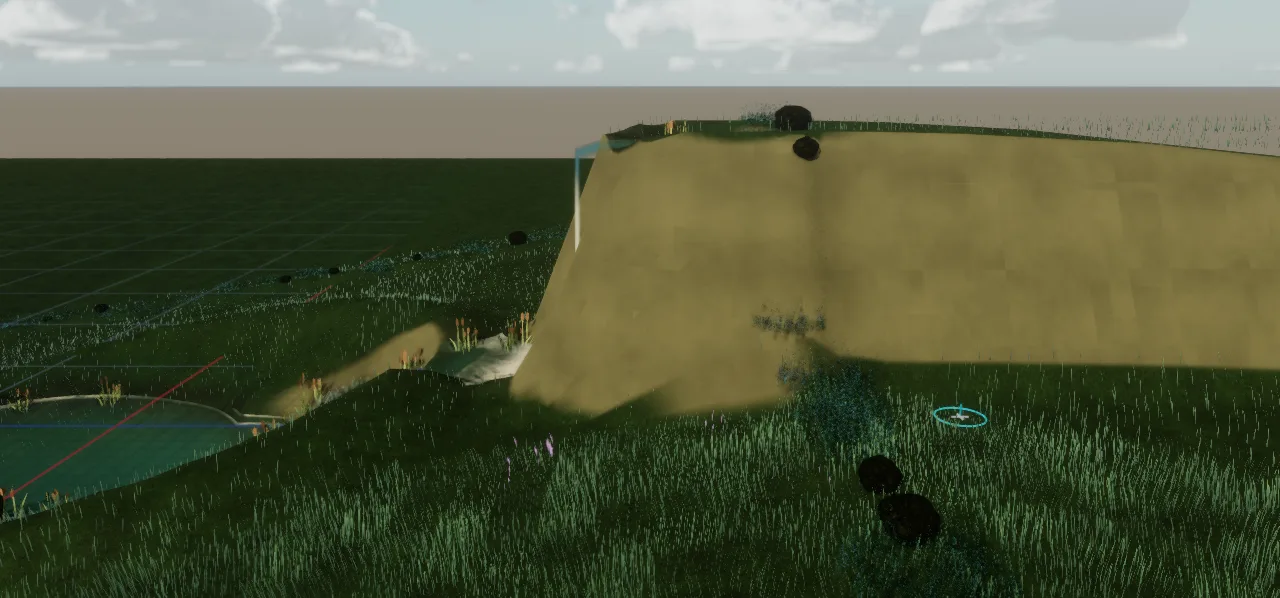
The level editor runs on the game's own level file, renderer and physics, and its strangest bug was a sculpted hill that looked flat because a shortcut skipped the lighting maths.
I sculpted a slope in the editor and the slope looked flat. The hill was there and the camera could climb it, but the light fell on it as if it were a table. If I painted one texel of colour on it with the paint brush, the shadows appeared.
It took seven builds to find out why.
The captures from this period were lost, so the images here are later screenshots of the same features.
The slope that stayed flat
The code that decides which way each bit of ground faces, which the lighting needs, had a shortcut. If the base terrain was flat and no paint strokes existed, it returned straight-up normals for everything, because there was nothing to compute.
That shortcut was written before sculpting existed. When sculpting moved into a separate height grid, the test still looked at the old inputs, and they said “flat” because the base terrain was flat and nobody had painted anything. The hill lived in a grid the test did not read. Painting one texel changed the condition, the shortcut no longer applied, and the real normals got computed.
One level file, two modes
The editor and the game load the same level document. When I move a light or change the rain in the editor, I am looking at the runtime light and the runtime weather, and when I press Play the same terrain produces the same collision. No export step bakes an editor scene into a second version that might differ in small ways.
Some objects are stored directly: a model path, a position, a collider. Terrain, walls, paving, grass and water are stored as recipes, and the game rebuilds their meshes from the parameters. Blender stays the source for individual models, and the editor owns where they go.
The editor is a separate part of the code that release builds leave out. That keeps gameplay code from ever depending on it, and it gives me a Windows build with exactly the renderer and physics of the game.
Why the first sculptor had to go
The first sculpting tool stored every brush stroke and replayed all of them whenever something changed, so it got slower with every stroke. To keep it bounded it silently dropped strokes after 256, and undo did not cover terrain edits at all. An adversarial review on 14 June looked at the editor as a level-design tool and not as a demo, and a sculptor that quietly forgets the oldest strokes does not pass that.
The replacement stores a grid of height differences. The procedural base terrain stays untouched, and the grid holds only what the brush added or removed. Streams and pools are another term in the same height function, so deleting a stream gives back the ground that was under it.
The panel that touched the terrain every frame
A rebuild kept happening when nobody touched the terrain. An editor panel read the terrain in a way Bevy counts as a write, so every system waiting for “the terrain changed” ran every frame the panel was visible. Now panels read without marking anything, the editor marks a real edit by hand, and the rebuild also compares a content hash, so a false alarm costs a comparison and not a mesh. The code is in the details below.
Blender habits and two panel bugs
I use Blender, so I asked for the editor camera and transform keys to match the habits that carry over: middle mouse orbits, Shift-middle pans, the wheel zooms, and G, R and S pick translate, rotate and scale. The orbit pivots around the point under the pointer, and zoom moves towards it. We did not copy Blender’s full modal transform language: the letters choose a gizmo mode, and the gizmo handle chooses the axis.
Two UI bugs made the editor feel less stable than its feature list suggested. A click on a docked side panel could go through and select an object in the 3D view. egui’s pointer-capture query handled floating windows better than docked panels, and its answer changed while the button was held. The fix uses geometry: after all panels are laid out, only the remaining central rectangle may send pointer input to the scene.
On Windows, every panel also looked like it was vibrating. The editor set the UI scale to 1.25 while the egui integration put its own 1.0 back every frame, so the value alternated at frame rate. Writing the scale into the integration’s own settings stopped the fight.
After a few wrong selections through a panel I stopped trusting whether the next move would affect the object I could see or the one hidden behind the UI, so the input fix had to land before any more authoring tools were worth building.
How we work on it
I play or edit a numbered build and write down specific failures, and each item becomes a tracked change by one of the agents. From July we call these review cycles “rounds”. Comments near tuned code keep the observation that forced the change, so a strange constant can be traced to the reason it exists.
Under the hood: the terrain function and undo
Base. The unedited height combines multi-octave noise, soft ridges and depressions. It gives a usable surface before any level-specific work.
Sculpting. A grid at 50-centimetre spacing stores signed differences from the base and is sampled bilinearly. The brushes raise, lower, smooth, flatten or paint. A stroke leaves a stamp every third of its radius, so fast pointer movement does not leave gaps.
Water cuts. Streams and basins contribute separate analytic cuts. They can be moved or removed without damaging the sculpt grid.
Undo. At pointer-down the editor snapshots the document. At pointer-up it records one undo step only if the document changed. The history keeps 64 steps. In the simplified interface the button is labelled “Oops”.
Mesh sizes. The visible terrain mesh samples the height function every 25 centimetres. The collider came from the same samples at 75 centimetres (ADR-0021, 2 June; the spacing has changed since, see episode 3). Rebuilding the visible surface took 229 ms with rows generated one after another, and 37 ms once the rows were split across the available cores. The editor still rebuilds the complete mesh after each stamp. Chunking would make it faster, but at this level size the whole-mesh rebuild is easier to check by eye, so I left it.
Where the editor lives. The editor is in sd-dev-tools, an optional crate that is left out of release builds (ADR-0017). Gameplay code can never depend on it, because the dependency only points one way, and I get a Windows build with the exact renderer and physics of the game.
The first sculptor. Its cost grew with strokes times vertices, which is why it dropped strokes after 256.
Under the hood: reading a resource without marking it changed
The panels receive &mut EditorSceneLayout and &mut TerrainSurface to hand to widgets. Going through as_deref_mut() uses DerefMut, and that marks the resource as changed on every frame the panel draws, with the mouse still. Every is_changed() gate in the scene (terrain snapshot, grass maps, atmosphere, water, streams, paving) stayed open for as long as the editor was.
The panels now take the reference without marking it:
pub(crate) fn quiet<'a, T: Resource + Component<Mutability = Mutable>>(
    resource: &'a mut Option<ResMut<'_, T>>,
) -> Option<&'a mut T> {
    resource
        .as_mut()
        .map(|resource| resource.bypass_change_detection())
}
After drawing, the code calls set_changed() only if a widget could have written in that frame: a key or text event, a mouse button pressed or released, the wheel over a panel, a drag that started on egui, or a focused text field. Mouse movement alone and idle frames mark nothing. The test is deliberately wide. Marking a change that did not happen costs what it cost before the fix, and missing one would leave the scene behind the document.
Next time: clouds that disappear when you ask for more of them, and rain that has to land somewhere.