Clouds that vanish, rain that has to land
How we built the sky for Slip & Die in Bevy: volumetric clouds without a planet, rain that reaches the ground, lightning that strikes somewhere real, and a global weather state every system reads.
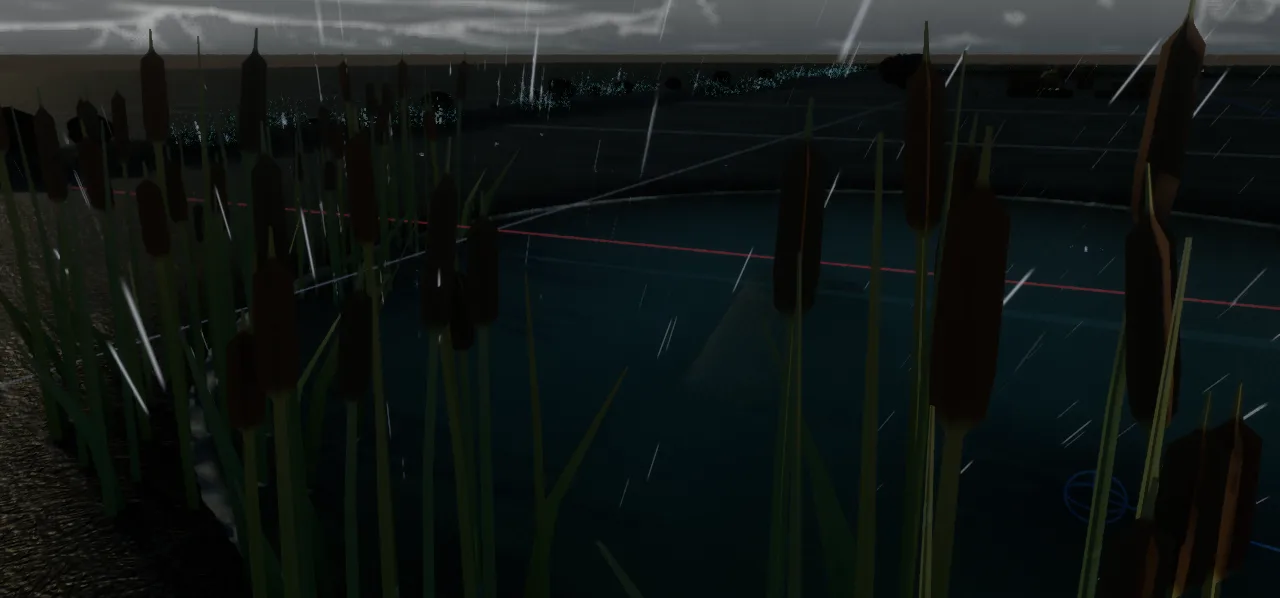
The sky changes over time, so it is rendered live: volumetric clouds, rain, puddles and lightning, all driven from one weather state.
Most of the work was finding why things disappeared: clouds with no room to exist, clouds whose rays ran out of steps, rain that fell on nothing.
Raising the coverage slider made the clouds go away. That is the opposite of what a coverage slider does. The distant banks vanished first, and at full coverage I was left with a sky that had some clouds near the zenith and nothing near the horizon.
The cause was a loop that gave up too early, and I will get to it after the first problem, which was that the clouds were not there at all.
Why not a skybox
On 18 June we decided against an HDRI sky. An HDRI fixes sun, cloud shape and time of day into one picture, while the game needed weather that changes, a sun that moves and a night. We looked at three Bevy cloud implementations. All three brought their own skybox, which gave us two atmospheres on top of each other.
We kept the volumetric technique and moved it into a post-process pass over Bevy’s own atmosphere. It is an optional feature, so a build can leave it out. For that case there is a flat cloud plane that follows the camera, and the editor warns when a level asks for volumetric clouds in a build that does not have them.
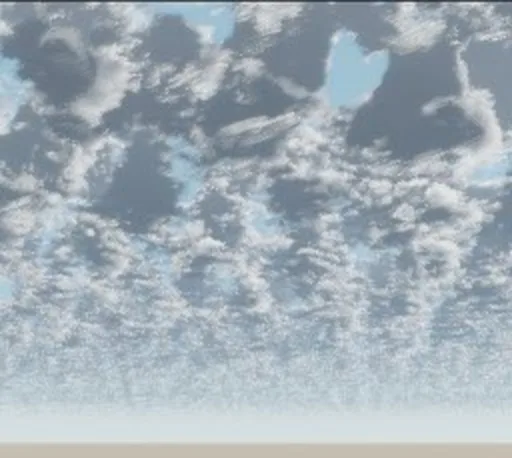
Removing the planet
After the move, the clouds disappeared. The cloud code we started from models a shell of cloud around an Earth-sized planet, so every point is about 6.4 million metres from the centre. At that distance the computer can only tell positions apart in steps of about half a metre. It is like measuring a banana with a ruler whose smallest mark is half a metre: the camera, one metre above the ground, was lost in the rounding.
We removed the planet. The cloud volume is now a flat layer between two small heights, and we bend it back down with a cheap formula so the sky still reads as curved from the ground.
The step budget
Once clouds were visible, two sampling problems showed up. High clouds had horizontal bands, and when the camera stood still and the sun moved, the banded part of the screen moved with it. The causes were coarse ray steps and shadow samples placed on a straight line.
The disappearing clouds were a budget problem. Each ray had 160 fine steps, about two kilometres of cloud, and in overcast weather a slanted ray stayed inside the layer for more than four kilometres. The loop ran out halfway, and the part it never reached became clear sky. Distant banks went first, because their rays are the longest. We fixed it by lengthening the steps late in the budget, and by ending the ray once the curved layer can no longer contain cloud.
Under the hood: why the planet had to go, and what the cloud pass computes
The float problem. The library implements the cloud system described for Horizon Zero Dawn. Around 6.4 million metres from the origin a 32-bit float moves in steps of around half a metre. The ray/sphere intersection squares the distance, so the rounding error became as large as the term that stands for a camera one metre above the ground. One call also mixed an altitude with a value that already contained the planet radius. A previous fork had made the same correction, but it was lost when the dependency was imported a second time.
Curvature. A flat ceiling converges to a vanishing point straight ahead, so each sample is lowered by d² / 2R, where d is the horizontal distance from the camera and R is an artistic number (500 km). The drop in the compute shader:
let d = pos.xz - config.camera_translation.xz;
let drop = dot(d, d) / (2.0 * max(config.planet_radius, 1.0));
return (pos.y - config.clouds_bottom_height + drop) / clouds_height;
d is relative to the camera, so the numbers stay small and nothing huge enters a float. A smaller planet_radius means more curvature.
Banding. The phase function hid the bands towards the sun (white) and away from it (black), so they only showed in the mid-tones. Besides coarse steps and six shadow samples on a straight line, integration bands appeared in concave parts of the cloud. Internal shadow samples now spread in a cone towards the sun.
Shape. A 128³ volume combines seven octaves of Perlin noise with three of Worley noise. A 32³ Worley volume erodes the edges. A 256² weather map controls coverage, rain and cloud type. The CPU evaluates the same field (CpuWeatherMap), so rain and lightning on the ground agree with the cloud overhead.
Light. A two-lobe Henyey–Greenstein phase function, approximate multiple scattering, Beer–Lambert transmittance and the “powder” term from Guerrilla’s cloud work.
Time. Clouds render at half resolution on a checkerboard. Missing samples are reprojected from the previous frame using the previous camera matrix and the wind displacement. On the test GPU that took the cloud pass from 73.7 to 39.7 ms: still expensive, but measurable.
Composite. The result is laid over the HDR scene as clouds.rgb + scene.rgb · alpha in a post-process node. The plugin’s own time-of-day is never used: the sun direction and colour come from the brightest directional light in the scene.
Rain has to reach the ground
Weather is one global state with wind, rain and wetness, plus a local rain value read from the weather map above the camera. Light rain falls in patches, so you can walk out of a shower, and a storm forces full coverage.
The first raindrops brought the scale problem back. At 1.2 centimetres wide they vanished after a few metres, and at 3 centimetres they looked like falling boards. Splashes were first placed at random in a ring around the player, so rain and impacts looked unrelated. They now sample the same volume as the drops and follow the wind-tilted fall direction. GPU particles cannot be read back cheaply, so the match is statistical: there is not one splash per exact drop.
Puddles form in real depressions. The system looks for points surrounded by rising ground and grows a water disc from the bottom, so deep basins fill first and dry last. Wet ground gets darker and smoother, and the same wetness changes how the banana moves: in a full puddle, acceleration and braking drop below half of their dry values. The game is called Slip & Die, and for a while the weather did nothing to the player.
Lightning
A strike has a position in the world. The game takes the wettest of eight random candidates on a ring around the camera and lights it with a brief point light. The cloud above gets an emissive glow around the strike. Lightning is gated by the global rain, and the time between strikes stretches when the camera sits in a dry patch of the storm, because a light show where it barely rains looks wrong.
Each strike records its distance from the camera, and thunder waits for sound to cover it at 343 metres per second. That logic was ready on 2 July. The audio file arrived on 5 September.
Darker when it rains
A storm darkens the scene by lowering camera exposure and the ambient fill, driven by the local rain, so in a patchy drizzle only the part of the level where it actually rains goes dark. Rain also thickens the fog, so light shafts read denser.
None of these systems read the editor’s settings. They read one weather resource, written once per frame from the authored settings, with rain and wind easing towards the target over about six seconds, so a storm builds up instead of snapping on.
Under the hood: how a new object reacts to weather
WeatherState is a global resource in sd-core with wind_direction, wind_speed, rain and wetness. A single system, sync_weather_state, writes it. Everything else only reads it, so adding wind to a prop is one system:
fn sway_my_prop(
    weather: Option<Res<sd_core::WeatherState>>,
    mut props: Query<&mut Transform, With<MyWindyProp>>,
) {
    let Some(weather) = weather else { return };
    let gust = weather.gust();          // 1 at calm, grows with wind and rain
    let dir = weather.wind_direction;   // XZ heading the wind blows towards
    // lean, sway or scroll a uniform by `gust` along `dir`
}
Local rain. LocalWeather holds the rain of the weather cell above the camera, smoothed over about 1.5 s, and falls back to the global value. Gloom, fog, rain audio and the wetness target all follow it.
Wetness. Puddles form in about two minutes under a drizzle and about ten seconds in a storm. Drying is slower than both.
Rain and lightning tuning. Drops at 18 m/s made bars across the screen, and 9 m/s read better from the banana-height camera. Lightning has a dim directional fill aimed at the strike, and the gap between strikes stretches up to about 3.3 times in a dry patch. The tuning constants sit in a data file that reloads while the game runs.
Gusts. The published wind speed is modulated by deterministic noise (three non-harmonic sinusoids) and quantised in 2% steps, so the is_changed gates downstream fire a few times a second, not every frame.
Rain hysteresis. Particle bands from drizzle to storm switch with a margin of 0.06 around each threshold, because the local rain flutters and would otherwise respawn the whole column every few frames.
What is still missing: wetness is one number for wherever the camera is, so the whole level shares it. A map of wet and dry ground would fix that, and it is not built yet.
Next time: a month spent making night dark, while Bevy upgraded underneath.